Pin Drop vs Lead Mapper

Two ways to map your CRM. One sends your team to a separate app. One lives inside the CRM they already use.
Lead Mapper and Pin Drop both turn CRM data into maps for field sales teams. The structural difference is where the product runs. Lead Mapper sits in its own web app at lead-mapper.com. Pin Drop lives inside the CRM your team already uses.

Lives inside your CRM

A map tile on every Company and Person record. A full-screen view one click away. Your team never leaves Attio to get to their map.

One product, three surfaces

The same map runs on the web, on iOS, on Android and inside your CRM. No separate accounts. No separate logins.

Transparent pricing

Pin Drop Team and Team+ are published on the pricing page. No "free trial then sign up to find out the cost." You see the bill before you commit.

Pipeline on the pin

Pins on the map are colour-coded by their current CRM deal stage. Glance at your territory and immediately see hot vs cold.

When mapping has to live where the work already does

Lead Mapper is a capable mapping product. It covers route optimisation, territory planning and performance analytics for the field sales rep workflow. It integrates with Attio, HubSpot, Pipedrive, Zoho, Less Annoying CRM, Zendesk Sell and Close CRM.

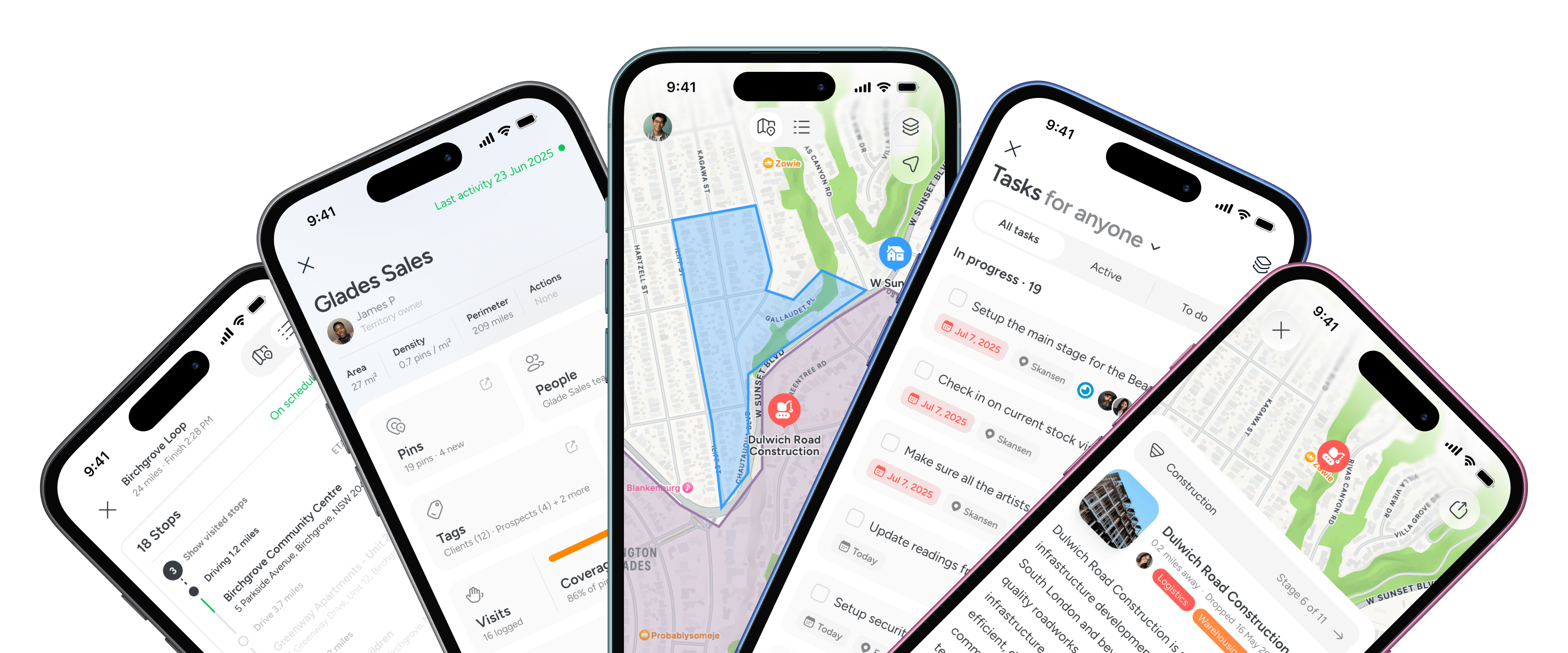
Pin Drop covers the same workflow. Multi-stop routes with traffic awareness. Custom-drawn territories with ownership and coverage. Location-based reporting. It also lives inside the CRM your team already uses. It runs natively on iOS and Android. The pricing is published.

The structural difference is what happens after the install. Lead Mapper pulls your CRM data into its own product at lead-mapper.com. Your team logs into a second tool to plan the day, back into Attio to update records, then back to Lead Mapper to mark visits. Two tabs. Two logins. Two mental models.

Pin Drop puts the map inside the CRM. The widget shows up on every Company and Person record. The full map opens inside Attio. The mini-card on each pin links straight back to the record. The team never leaves the place they already work. They just gain a geographic view of what was already there.

Lead Mapper is the mapping layer on top of someone else's CRM. Pin Drop is a mapping product that integrates into yours.

Capability

Pin Drop

Lead Mapper

Best suited for
Pin Drop
Teams who want geographic context inside their existing CRM, plus mobile and standalone access
Lead Mapper
Field sales reps who'll work inside a dedicated mapping tool alongside their CRM
Flexibility
Pin Drop
Map renders inside Attio on every record page and as a full-screen embed; no context-switch
Lead Mapper
Map renders in lead-mapper.com web app; sign-up and tab-switch required
CRM dependency
Pin Drop
Optional. Works standalone or with CRM
Lead Mapper
Required. Designed as a layer over a connected CRM
Mobile experience
Pin Drop
Native iOS and Android apps; full map and pin tools on the go
Lead Mapper
Web-first; no dedicated mobile app
Route optimisation
Pin Drop
Multi-stop routes with traffic awareness. Launch navigation in Apple Maps, Google Maps or Waze
Lead Mapper
Built-in route planner inside the web app
Territory management
Pin Drop
Custom-drawn territories with ownership, overlap support and coverage analysis
Lead Mapper
Territory management built into the web app
Pipelines tied to location
Pin Drop
Pins colour-coded by current CRM deal stage, updated via webhook
Lead Mapper
Filterable by deal data, no native deal-stage colouring on pins
How Pin Drop works

The map should live where your team already works

Both connect to your CRM. Pin Drop puts the map inside it.
Map on every record page
One product, web + mobile + CRM
Transparent published pricing
Pipeline-aware pins out of the box
BEST OF 2013
& Editors Choice
Rated 4.7/5
Based on 1.4k+ ratings
FEATURED APP
162 App Stores
Compare plans
Mapping that lives where work happens

When the map is part of the CRM, the team actually uses it

Field teams use Pin Drop because the map is one click away inside the tool they already open every morning. Not a separate app to remember.
“Structured site records improved how we report on contract performance.”
Aisha Rahman
Client Services Director
“Structured location based records strengthened our audit readiness.”
Amina Al Saadi
Compliance and Risk Lead
“I don’t have to remember details from the last visit. It’s already there.”
Chris
Route Operator
Guided walkthrough

A closer look at how teams work together with Pin Drop

Take a short walkthrough of how teams keep track of work across locations, without spreadsheets or scattered tools.

FAQs

Is Pin Drop a CRM?
Does Pin Drop integrate with Salesforce?
Can I import my accounts?
Does Pin Drop offer turn-by-turn navigation?
Can Badger Maps manage project pipelines?
Start mapping